How to Deposit at Duel Casino
Duel is crypto-only, and its deposit flow is built around that: around 16 coins, a unique address per player, no Duel-side fees and balances that credit after a single network confirmation. Here is the whole process, plus how to pick the network that saves you money.
Before You Deposit
You need two things: a Duel account (two minutes, no KYC, see the registration guide) and some cryptocurrency in a wallet you control. That can be an exchange account like Binance or Kraken, a browser wallet like MetaMask, or a hardware wallet. If you own no crypto at all, skip ahead to the on-ramp section: Duel lets you buy coins directly on the site with a card.
There are no minimum-deposit games here and no Duel-side fees. The only cost of moving money in is the blockchain network fee, which you control by picking the right coin.
The Deposit Flow, Step by Step
- Log in and open the Wallet, then choose Deposit.
- Pick your coin and, where relevant, the network. USDT, for example, exists on several networks with very different fees.
- Copy your unique deposit address or scan the QR code from your own wallet app.
- Send the funds and wait. The balance credits after one confirmation, typically a couple of minutes for most coins.
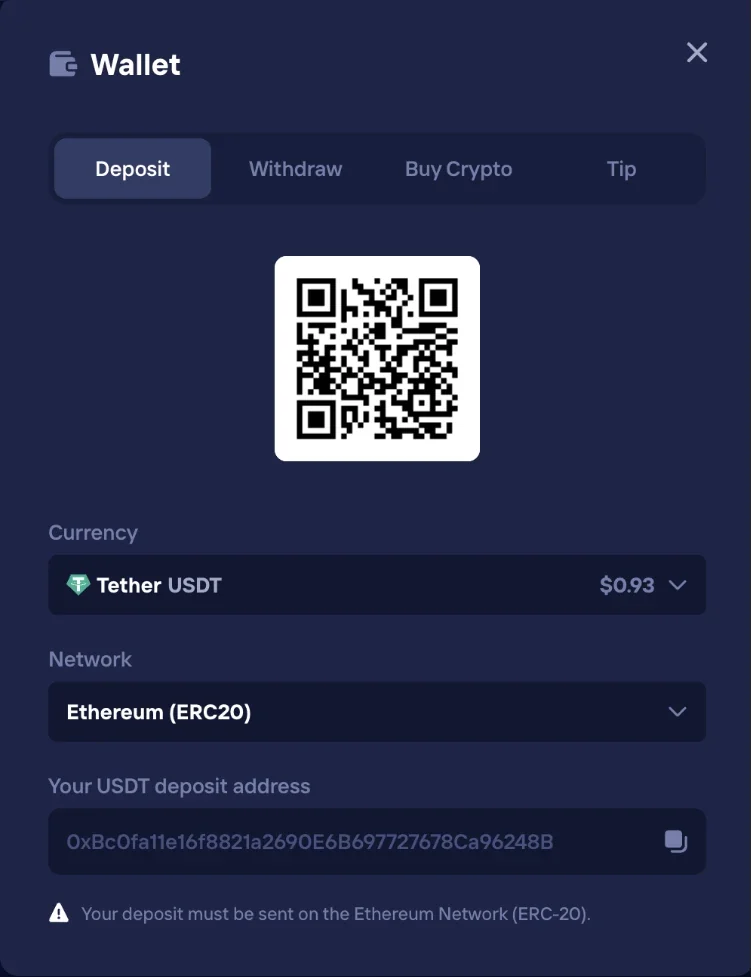
Which Coin Should You Use?
All supported coins land in the same unified balance, so the choice comes down to speed and network cost:
| Coin | Typical time to credit | Network fee |
|---|---|---|
| USDT (TRC-20) | Under 2 min | A few cents |
| TRX | Under 2 min | A few cents |
| SOL / USDC | Under 5 min | Very low |
| LTC | Under 5 min | Low |
| ETH (ERC-20) | Under 5 min | Gas-dependent |
| BTC | 10–60 min | Network-dependent |
If you play regularly, USDT on TRC-20 is the practical default: stable value, near-instant credits and negligible fees. Bitcoin works fine but makes you wait for confirmations at busy times.
The one mistake that actually loses money
Always send exactly the coin and network shown on the deposit screen. ETH to a BTC address, or USDT on the wrong network, can be unrecoverable. Double-check the first and last four characters of the address after pasting, clipboard-hijacking malware exists and targets exactly this moment.
No Crypto Yet? Buy It On-Site
The built-in fiat on-ramp
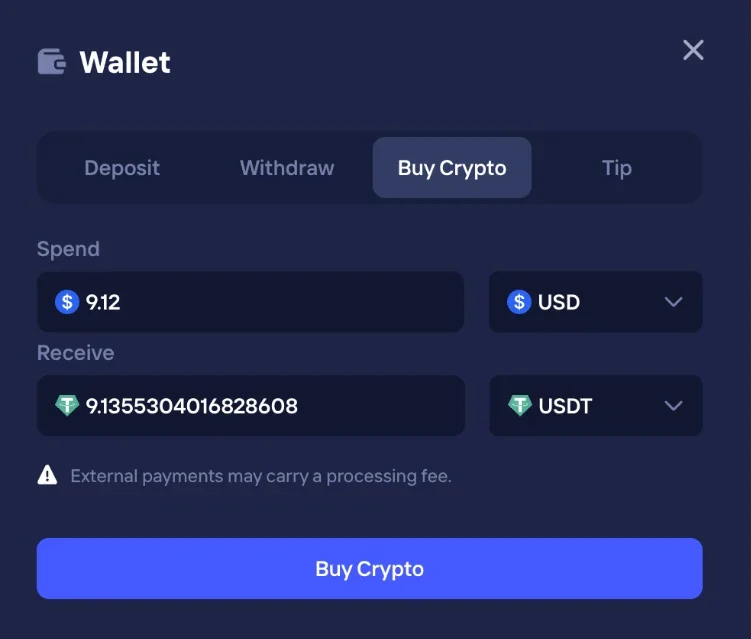
Duel has an integrated buy-crypto flow: pay with Visa, Apple Pay, Google Pay, Interac or AstroPay, and the coins land straight in your Duel wallet, no exchange account needed. It is the fastest route from a bank card to a playable balance.
The trade-off is price: on-ramp fees run roughly 1.75% to 6.7% depending on method. For larger or regular deposits, buying on Binance or Kraken and transferring in via TRC-20 is meaningfully cheaper.
Deposit FAQ
How long do Duel deposits take?
Funds credit after one blockchain confirmation. USDT on TRC-20, TRX and Solana usually land within a couple of minutes; Bitcoin can take 10 to 60 minutes depending on network congestion.
Does Duel charge deposit fees?
No. Duel itself charges nothing on deposits, you only pay the blockchain network fee. Picking a cheap network like TRC-20 keeps that fee to a few cents.
Which coins does Duel accept?
Around 16 coins including BTC, ETH, LTC, USDT, USDC, BNB, TRX, SOL, XRP, DOGE, ADA, AVAX, TON, LINK and HBAR.
Can I deposit without owning crypto?
Yes. The built-in fiat on-ramp accepts Visa, Apple Pay, Google Pay, Interac and AstroPay. Fees run roughly 1.75% to 6.7%, so an exchange transfer is cheaper for bigger amounts.
What happens if I send the wrong coin?
Sending an unsupported coin, or the right coin on the wrong network, can permanently lose the funds. Always match the coin and network shown on the deposit screen exactly.
Balance funded? Time to play
Deposits credit in minutes. Every bet you place starts earning rakeback immediately.
Deposit at Duel